
Top 10 AI Writing Tools for Content Creators in 2026
Let’s get the obvious out of the way first: there are now hundreds of AI writing tools on the market, and most of them will promise you the exact same things. Faster content. Better SEO. More traffic. Less time staring at a blank screen.
Most of those promises are at least partially true. But what they don’t tell you is that these tools are built very differently, serve very different use cases, and can actually slow you down if you pick the wrong one for how you work.
I’ve spent serious time with all ten tools on this list — not just signing up for trials and poking around for twenty minutes, but actually using them to produce real content. Blog posts, product reviews, social copy, email sequences, long-form guides. The kind of stuff content creators actually need to produce week in, week out.
Here’s what I found.
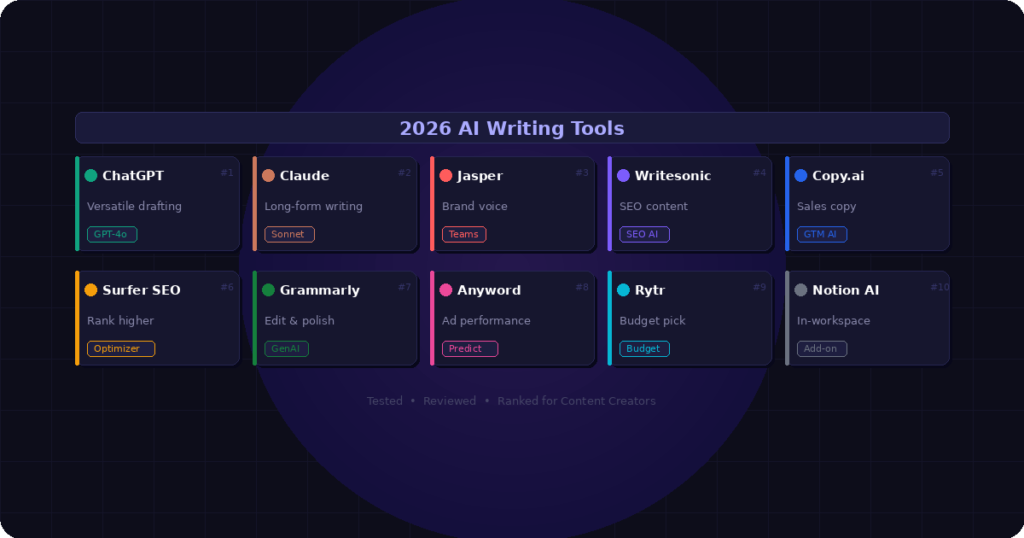
Quick Comparison: All 10 Tools at a Glance
| Tool | Best For | Starting Price |
| ChatGPT Plus | Versatile drafting & ideation | $20/month |
| Claude | Long-form, nuanced writing | $20/month |
| Jasper AI | Brand-consistent team content | $59/month |
| Writesonic | SEO blog posts at volume | $16/month |
| Copy.ai | Sales & marketing copy | Free / $36/month |
| Surfer SEO | Content optimization for ranking | $69/month |
| Grammarly | Editing, grammar, tone polish | Free / $12/month |
| Anyword | Ad copy with performance scores | $49/month |
| Rytr | Budget-friendly short-form content | Free / $9/month |
| Notion AI | Writing inside your workspace | $10/month add-on |
1. ChatGPT Plus — The Swiss Army Knife
If you only had to pick one AI writing tool in 2026 and never use another, ChatGPT Plus would still be the most defensible choice. Not because it does any one thing better than everyone else, but because it does everything reasonably well — and the GPT-4o model has quietly gotten very good at producing content that doesn’t feel robotic.
For content creators specifically, it’s best as a starting engine. You give it a topic, some context, maybe a rough angle you want to take, and it helps you break through the blank page problem. From there, you shape the draft into something that sounds like you. That workflow — AI for the scaffold, human for the voice — is where most experienced creators land after experimenting for a while.
The Custom GPT feature is genuinely underrated. You can build a personalized assistant that already knows your niche, your tone, your audience, and your common content formats. Once you’ve set that up, prompting takes half the time.
Best for: Bloggers, solo creators, and freelancers who need a flexible all-rounder.
Weakness: Doesn’t have built-in SEO tools. Also, the web browsing and research features, while improved, still occasionally hallucinate sources.
Price: Free tier available. Plus plan is $20/month for GPT-4o access.
2. Claude — Best for Long-Form and Nuanced Writing
Claude has become a serious favourite among writers who care about prose quality. The way one reviewer put it recently: Claude writes like it has actually thought about what it’s saying. That’s a fair description. Where other AI tools produce text that’s technically correct but somehow hollow, Claude tends to generate writing that has a point of view and a cleaner sense of structure.
The big practical advantage for content creators is the context window. If you’re writing a 3,000-word in-depth article, you need a tool that can hold the entire piece in mind and keep it coherent from top to bottom. Claude handles this better than most. It remembers the arc of a piece and maintains consistent tone across very long documents without drifting.
Where it falls short is in marketing-specific workflow features. There are no built-in templates, no SEO scoring, no brand voice settings you can configure and save. It’s a writing tool, not a content platform. For many individual creators that’s actually a feature — less friction, cleaner interface — but teams with complex workflows may find it limited.
Best for: Writers, bloggers, and consultants producing long-form, research-heavy, or nuanced content.
Weakness: No native SEO tools or content marketing workflow features.
Price: Free tier available. Claude Pro is $20/month.
3. Jasper AI — Best for Marketing Teams at Scale
Jasper is the premium option on this list, and it earns that premium in a specific scenario: marketing teams that need to produce high volumes of on-brand content consistently. The Brand Voice feature is where Jasper truly differentiates itself. You train it on your style guide, your past content, and your product documentation — and it actually maintains that voice across everything it generates.
The Campaigns feature is also impressive for teams. Feed Jasper a single campaign brief and it’ll generate a coordinated set of deliverables — a blog post, social copy, email sequence, and ad variations — all staying consistent with each other and with your brand. That kind of end-to-end content production is genuinely difficult to replicate without a tool like this.
The honest caveat: Jasper requires real investment upfront before it delivers on its potential. There’s a learning curve, and if you approach it as a plug-and-play tool expecting instant results, you’ll be disappointed. The teams that get the most out of it treat it as infrastructure — something they’ve configured carefully and integrated into their workflow — not just a quick draft generator.
Best for: Marketing teams and agencies with consistent brand voice requirements and high content volume needs.
Weakness: Expensive for solo creators. Requires significant setup time. Overkill if your content needs are modest.
Price: Creator plan from $59/month. No free tier — 7-day trial requires credit card.
4. Writesonic — Best for SEO-Focused Bloggers
Writesonic has carved out a clear lane: affordable, SEO-focused, long-form content for bloggers and affiliate marketers who need volume. Its Article Writer 6.0 is built specifically to generate structured, search-optimised posts, and it can publish directly to WordPress once you’ve reviewed the draft. For a content site operator who needs to ship three articles a week, that direct pipeline is a significant time saver.
Chatsonic — Writesonic’s conversational AI feature — includes real-time web search, which means it can pull current information into your content rather than relying on training data alone. That matters enormously for topics where freshness is important, like tech reviews, news commentary, or anything involving current statistics.
The tradeoff is that Writesonic’s output still has a certain generic quality that requires editing, particularly for competitive or YMYL (Your Money or Your Life) topics. Google has increased scrutiny of AI-generated content in categories like finance, health, and legal advice, so anything in those spaces needs more careful human editing before it’s ready to publish.
Best for: Bloggers, affiliate marketers, and content site operators who need SEO-optimised articles at volume on a budget.
Weakness: Generic output quality on competitive topics. Brand voice feature is inconsistent according to multiple user reviews.
Price: Free tier: 10,000 words/month. Individual plan from $16/month.
5. Copy.ai — Best for Sales and Marketing Copy
Copy.ai started life as a short-form copy tool — ad headlines, email subject lines, product descriptions, social captions — and that heritage still shows in where it performs best. When it comes to conversion-focused writing, its templates and GTM (Go-to-Market) Workflows produce output that Jasper and Writesonic often can’t match.
The 2025-2026 pivot to full GTM Workflows changed what Copy.ai is capable of. You can now build automated content workflows where you define inputs, set outputs, and run the workflow repeatedly. Need 50 product descriptions? One workflow, 50 outputs. Need a weekly social content bundle? Schedule the workflow and let it run. For teams running high-volume sales and marketing operations, that’s powerful.
What it isn’t great for is long-form editorial content. Ask Copy.ai to write a 1,500-word blog post from scratch and you’ll get something that needs substantial editing. It’s optimised for 50-500 word outputs. If your primary need is in-depth articles, the other tools on this list will serve you better.
Best for: Marketers, sales teams, and e-commerce operators who need fast, conversion-focused short-form copy at scale.
Weakness: Not built for long-form content. Free plan was reduced significantly in 2025.
Price: Free tier available. Pro plan from $36/month.
6. Surfer SEO — Best for Ranking Content
Surfer SEO is a different kind of tool from everything else on this list, and it’s important to understand that distinction before evaluating it. Surfer doesn’t generate content from scratch the way ChatGPT or Jasper does. What it does is analyze the top-ranking pages for any given keyword and tell you exactly what your content needs to include to compete — keywords, headings, word count, questions to answer, structure, and more.
In practice, most content creators use Surfer alongside a writing tool rather than instead of one. You might draft your article in ChatGPT or Claude, then run it through Surfer’s content editor to see what you’re missing. The real-time content score as you write or edit is genuinely useful — it turns SEO optimization from a guesswork process into a concrete checklist.
It’s expensive for what it does, particularly on the entry-level plan where credit limits are easy to exhaust. But if you’re serious about ranking organic content, combining an AI writing tool with Surfer is one of the most defensible workflows available right now.
Best for: Content marketers, SEO professionals, and bloggers serious about Google rankings.
Weakness: Pricey. Not a content generator — needs to be paired with a writing tool.
Price: From $69/month. No free plan, but free AI outline generator available.
7. Grammarly — Best All-Round Editor
Grammarly has been around long enough that people sometimes underestimate what it does now. The core grammar and spell-checking product has been expanded significantly with Generative AI features (previously called GrammarlyGO). You can now use it to generate drafts from prompts, rewrite paragraphs, adjust tone, shorten or expand content, and reply to emails — all from within the browser extension that works across 500,000+ apps.
For content creators, the most practical use case is as a final layer over whatever else you’re using. Write your draft in ChatGPT or Claude, paste it into Grammarly, and let it catch anything that slipped through — not just grammar errors, but clarity issues, passive voice, overlong sentences, and tone inconsistencies. That editorial layer before hitting publish is genuinely valuable.
The free plan is more useful than most people realise. You get 100 generative AI prompts per month and solid grammar checking at no cost. The Premium plan at $12/month is reasonable for the features you get, making it one of the best value tools on this entire list.
Best for: Every content creator as a final editing layer. Also strong for professionals who write across email, docs, and web platforms.
Weakness: Not a standalone content creation platform. AI generation features are less powerful than dedicated writing tools.
Price: Free tier: 100 prompts/month. Premium from $12/month.
8. Anyword — Best for Performance-Driven Ad Copy
Anyword is the only tool on this list that tries to predict whether your copy will actually perform before you publish it. Its predictive performance scoring analyses each piece of content and gives it a score based on how likely it is to convert for your target audience and channel. That’s genuinely novel — instead of writing ten ad variations and testing them all, you can see projected performance upfront and pick the strongest one.
The audience targeting features are well-built. You can define your target demographic, and Anyword adjusts its suggestions accordingly. For paid media teams running Facebook or Google campaigns, this level of specificity is useful in a way that general-purpose tools simply can’t match.
Where Anyword struggles is in producing content that feels natural and readable for general audiences. Multiple reviewers have flagged that the copy can skew toward complex phrasing that prioritises keyword inclusion over actual human clarity. It’s a tool that rewards users who know how to work with its output critically, not one you can simply trust to produce publish-ready copy.
Best for: Digital marketers, paid media teams, and growth marketers focused on conversion-optimised ad and landing page copy.
Weakness: Output can feel overly complex. Not ideal for editorial or long-form content.
Price: From $49/month. 7-day free trial available.
If budget is a genuine constraint — and for a lot of solo creators and freelancers it is — Rytr deserves serious consideration. It’s the most affordable serious AI writing tool available, with a free plan that includes 10,000 characters per month and a paid plan starting at just $9/month. For someone producing blog introductions, email copy, product descriptions, or social posts, that’s more than enough.
The interface is clean and genuinely easy to use. You pick a use case (there are 40+ including blog sections, ad copy, email subject lines, SEO meta descriptions, and more), choose a tone from over 20 options, and generate. The quality for short-form content is solid. It’s not going to blow you away, but for the price, it’s hard to argue with.
The honest limitation is long-form content. Anything over about 1,000 words tends to require significant editing to reach a publishable standard. But for creators who are primarily using AI to handle the repetitive, lower-stakes writing tasks — social captions, email drafts, quick product descriptions — Rytr handles those well and frees up mental energy for the work that actually needs your full attention.
Best for: Freelancers, solopreneurs, and beginners who need a capable AI writing assistant without a large budget.
Weakness: Quality drops significantly on long-form content. Lacks advanced SEO and workflow features.
Price: Free tier: 10,000 characters/month. Saver plan from $9/month.
10. Notion AI — Best for Creators Already Using Notion
Notion AI isn’t really competing with the other nine tools on this list. It’s a different proposition: an AI writing assistant that lives inside your existing Notion workspace rather than requiring you to switch to a new platform. If you’re already using Notion to manage your content calendar, draft articles, take meeting notes, and organize your research, the AI features add genuine value without disrupting your workflow.
The practical uses are things like: summarize your research notes into a brief, generate a blog outline from a collection of bullet points, rewrite a rough paragraph so it reads more clearly, or translate content into another language. It’s not going to replace a dedicated writing tool for heavy content production, but it’s an excellent complement to one.
The pricing is also sensible — it’s an add-on to existing Notion plans at $10/month per user, which is reasonable given how embedded it becomes in a Notion-heavy workflow.
Best for: Solopreneurs and creators who already use Notion as their primary workspace.
Weakness: Not a standalone writing tool. Not designed for long-form blogging or SEO-optimised content.
Price: $10/month add-on to existing Notion plans.
How to Actually Choose the Right Tool
After going through all ten, the honest answer is that most people don’t need to pick just one. The best content creators in 2026 are using two or three tools together rather than expecting one to do everything.
Here’s a practical starting stack depending on what you’re trying to do:
If you’re a blogger or affiliate marketer: Writesonic or ChatGPT Plus for drafting + Surfer SEO for optimisation + Grammarly for editing.
If you’re a freelance content writer: Claude for long-form quality drafts + Grammarly for final polish.
If you’re in marketing or running paid ads: Copy.ai for sales copy + Anyword for ad testing + Jasper if your team needs brand consistency.
If you’re on a tight budget: Rytr for drafting + Grammarly free tier for editing. Genuinely enough to get started.
Final Thoughts
The single most important thing to understand about AI writing tools in 2026 is that they’ve moved from novelty to infrastructure. The question is no longer whether to use them — it’s which ones fit into your workflow and which don’t.
None of these tools are a replacement for human judgment, original thinking, or actual expertise in your subject matter. The content that performs best in 2026 is the content that uses AI to remove the friction from the process while keeping the human perspective — the experiences, the opinions, the stories — clearly at the centre.
Pick the tool that solves your actual bottleneck. If your problem is blank-page paralysis, ChatGPT or Claude will fix that. If your problem is publishing fast enough to compete in SEO, Writesonic plus Surfer will get you there. If your problem is maintaining brand voice across a growing team, Jasper is built for that.
Start with one tool. Use it properly for 30 days before adding another. The best content workflow is the one you’ll actually stick with
Affiliate Disclosure: This post contains affiliate links. If you purchase a product through one of our links, we may earn a small commission at no extra cost to you. All opinions are our own and based on genuine testing.